
llucps
-
Posts
83 -
Joined
-
Last visited
-
Days Won
4
Everything posted by llucps
-
 Yes you're right, it was me that I had that redirection in place. I removed and I've been able to login just fine. Thank you
 -
umm.. I'm confused, checking the domain on the Settings panel it seems to be correct: And the apache config file 10_froxlor_ipandport_xxx.xxx.xxx.443.conf:
-
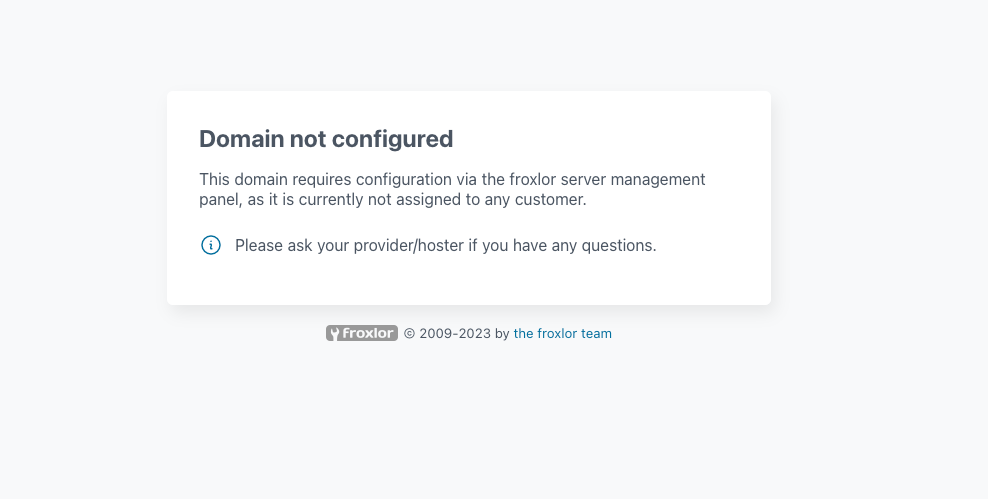
Hi, After upgrading to Froxlor 2.1 I get this message: My main domain is not managed by Froxlor, but rather manually, mainly because back in the day Froxlor didn't support SSL wildcards certificates, so I managed the main domain myself. I'm guessing this is is the reason ? [other] Domains pointing to the server but are unmanaged by froxlor will now display a corresponding message Any idea of how to resolve this? I would like to keep my main domain as it was and not having Froxlor managing it if possible. Thanks.

-
Best way to upgrade-update Froxlor since v2.0
llucps replied to llucps's question in General Discussion
Understood 👍 Thanks. -
I recently upgraded one of my servers from 0.10.38 to 2.0.5 following the upgrade manual listed on the documentation, and all went well. This morning I saw there was an update to 2.0.7 and I updated with the the command ./bin/froxlor-cli froxlor:update And all went well as well. The weird this my Froxlor installation using the official deb repository wasn't were that I already updated to the latest 2.0.7 version. So I ran apt update and it also went well, but I already did have the latest version that I just installed. So, what's the best approach to update/upgrade Froxlor from now on? I'm a bit confused between apt update and the new Froxlor command ./bin/froxlor-cli froxlor:update Thanks.
-
I meant that as a compliment being the only thing I had to do following the migration guide which I re-read several times
-
Bravo! 👏👏👏👏 I had no idea that you're working on Froxlor revamp. It's been a nice surprise. Thank you! For the moment I just upgraded one of the two servers, the one with less services just in case. The only thing I had to do was commenting out the default_pass_scheme = CRYPT option Kudos to all the team @d00p P.D. I'm just curious about the new path to /var/www/html/ . Why of that change? Nevermind I see that that it was a frequent request https://github.com/Froxlor/Froxlor/issues/1068
-
release Security Release 0.10.38.3 - Maintenance and minor bugfixes
llucps replied to d00p's topic in Announcements
Thanks @d00p! -
release Release 0.10.37 - Maintenance and minor bugfixes
llucps replied to d00p's topic in Announcements
Thank you! -
acme holt keine neuen Zertifikate von Letsencrypt - Froxlor 0.10.34.1
llucps replied to df8oe's question in German / Deutsch
I also encountered this problem a couple of weeks ago, suddenly acme.sh was trying to renew one of my domains using ZeroSSL, when in all my settings I explicitly had Letsencrypt as CA. I managed to fix the problem by registering and account with ZeroSSL, it's just a command which registers an account bu using an email, as it's explained here https://stackoverflow.com/questions/68538044/why-cant-write-certificate-crt-with-acme acme.sh --register-account -m yyyy@yahoo.com Once I did that then I was be able to create a new certificate with ZeroSSL, then because I didn't want to change Letsencrypt I forced a new certificate renewal by specifying /root/.acme.sh/acme.sh --home "/root/.acme.sh" --renew-all --debug 2 --log --server letsencrypt --force I still have no idea why acme.sh was trying to use ZeroSSL to issue new certificates, but it's been working fine since then. -
Release file missing from Bullseye debian.froxlor.org?
llucps replied to llucps's question in General Discussion
Yes that was it, I changed to https://deb.froxlor.org/debian and it wored. Strange that has been working all the years, anyway. thanks! Lluc -
Release file missing from Bullseye debian.froxlor.org?
llucps posted a question in General Discussion
Hi, Since yesterday, I've been suddenly receiving these messages from cron /usr/sbin/apticron; then /usr/sbin/apticron --cron; E: The repository 'http://debian.froxlor.org bullseye Release' no longer has a Release file. and with apt-get update it complains about not finding the Release file: Err:10 https://deb.froxlor.org/debian bullseye Release 404 Not Found [IP: 185.123.52.110 443] Reading package lists... Done E: The repository 'http://debian.froxlor.org bullseye Release' no longer has a Release file. N: Updating from such a repository can't be done securely, and is therefore disabled by default. N: See apt-secure(8) manpage for repository creation and user configuration details. I see the Release file for Bullseye on http://debian.froxlor.log.. Is anyone else having this problem? Or is it just me? Strange.. Thanks Lluc -
Froxlor 0.10.29.1 (DB: 202109040) New domain no letsencrypt => error!
llucps replied to MeinerEiner's question in General Discussion
This also happened to me. What I did was first create the domain without SSL, and once done, this will add a A record for the new domain to the DNS and then I was able to create the certificate SSL with Let's encrypt. So basically I have to do it in two steps, this behavior I think is different when Froxlor was using certbot, I remember creating my previous domains and SSL certificates in one step. It's not a big deal but I just thought it was worth to mention. Is it also your case @d00p? Thanks, -
Thanks @d00p 👍
-
Post Bullseye update (Bind9 installed and running but not in /etc/init.d/bind9)
llucps replied to llucps's question in General Discussion
Yes that's what I thought I need to get used to systemd services syntax.. old habits Thanks, -
Hi @d00p, I just updated my server to Bullseye and although I had to reinstall mariadb, and also froxlor and some php7.4 packages it seems all is ok except with one thing bind9. After the upgrade the /etc/init.d/bind9 was missing.. the bind9 service is running fine because I can use service bind9 status and I see it running The problem is in DNS server reload command settings in Froxlor I had /etc/init.d/bind9 reload and obviously since it's not there it fails to reload the service. What I did was change the command to service bind9 reload and it seems to be working fine. My question is whether there should be really a bind9 in /etc/init.d When I installed bind9 again I get this message: Setting up bind9 (1:9.16.15-1) ... named-resolvconf.service is a disabled or a static unit not running, not starting it. Processing triggers for man-db (2.9.4-2) ... /etc/init.d/resolvconf status is working fine ● resolvconf.service - Nameserver information manager Loaded: loaded (/lib/systemd/system/resolvconf.service; enabled; vendor preset: enabled) Active: active (exited) since Sun 2021-08-22 08:03:27 CEST; 27min ago Docs: man:resolvconf(8) Main PID: 1774 (code=exited, status=0/SUCCESS) Tasks: 0 (limit: 4559) Memory: 0B CPU: 0 CGroup: /system.slice/resolvconf.service Do you have any idea whether there should be bind9 in /etc/init.d/? or just using service bind9 reload/restart/start is fine? Thanks!
-
Congratulations! Just out of curiosity, I'm gladly surprise that Bullseye support has been added already. Does that mean that changes between Buster and Bullseye are not that big? Thank you @d00p!
-
Is DKIM broken on latest Froxlor 0.10.22 update? (no key for signature)
llucps replied to llucps's question in General Discussion
I understand.. I would change to openkdim, but since it's not supported and I'm a bit afraid to make the change in case I screw up my email setup. I'll leave the change I did to remove .priv from lib/Froxlor/Cron/Dns/DnsBase.php for the moment. I would really appreciate if you can add the option the chose both options on the dkim Froxlor settings so I can continue it to use it with dkim-keys for the moment. eventually I'll have to make the change.. I know. Thanks @d00p -
Is DKIM broken on latest Froxlor 0.10.22 update? (no key for signature)
llucps replied to llucps's question in General Discussion
umm. sorry I'm not sure I quite follow you.. Do you mean that commit should be revert it? and leave the key name as it was: $privkey_filename = \Froxlor\FileDir::makeCorrectFile(Settings::Get('dkim.dkim_prefix') . '/dkim' . $domain['dkim_id']); -
Is DKIM broken on latest Froxlor 0.10.22 update? (no key for signature)
llucps replied to llucps's question in General Discussion
Both .priv and .public files are inside /etc/postfix/dkim directory.. but I don't recall at all the the public keys were referenced on the dkim-config.keys file, I'm pretty sure only the private keys are referenced. So.... I just removed the .priv extension that was added to the commit https://github.com/Froxlor/Froxlor/commit/15a13a7783d85f77efe1619ed85bd46e9ad3935b so the dkim-config.keys looks for: *@xxxxxx.com:xxxxxxx.com:/etc/postfix/dkim/dkim1 *@xxxxxx.com:xxxxxxx.com:/etc/postfix/dkim/dkim2 *@xxxxxx.com:xxxxxxx.com:/etc/postfix/dkim/dkim3 *@xxxxxx.com:xxxxxxx.com:/etc/postfix/dkim/dkim4 *@xxxxxx.com:xxxxxxx.com:/etc/postfix/dkim/dkim5 *@xxxxxx.com:xxxxxxx.com:/etc/postfix/dkim/dkim6 *@xxxxxx.com:xxxxxxx.com:/etc/postfix/dkim/dkim7 and it WORKS Authentication-Results: mx.google.com; dkim=pass header.i=@xxxxxxxxx.com header.s=dkim1 header.b=MAWt7cPM; I don't know what to do now... -
Is DKIM broken on latest Froxlor 0.10.22 update? (no key for signature)
llucps replied to llucps's question in General Discussion
Yes I posted the dkim-keys.conf on my previous post, which every line is for every domain I have on my system *@xxxxxx.com:xxxxxxx.com:/etc/postfix/dkim/dkim1.priv *@xxxxxx.com:xxxxxxx.com:/etc/postfix/dkim/dkim2.priv *@xxxxxx.com:xxxxxxx.com:/etc/postfix/dkim/dkim3.priv *@xxxxxx.com:xxxxxxx.com:/etc/postfix/dkim/dkim4.priv *@xxxxxx.com:xxxxxxx.com:/etc/postfix/dkim/dkim5.priv *@xxxxxx.com:xxxxxxx.com:/etc/postfix/dkim/dkim6.priv *@xxxxxx.com:xxxxxxx.com:/etc/postfix/dkim/dkim7.priv What I could try is to undo the .priv change on the commit you did on october the revert it how it was and see if it's working. -
Is DKIM broken on latest Froxlor 0.10.22 update? (no key for signature)
llucps replied to llucps's question in General Discussion
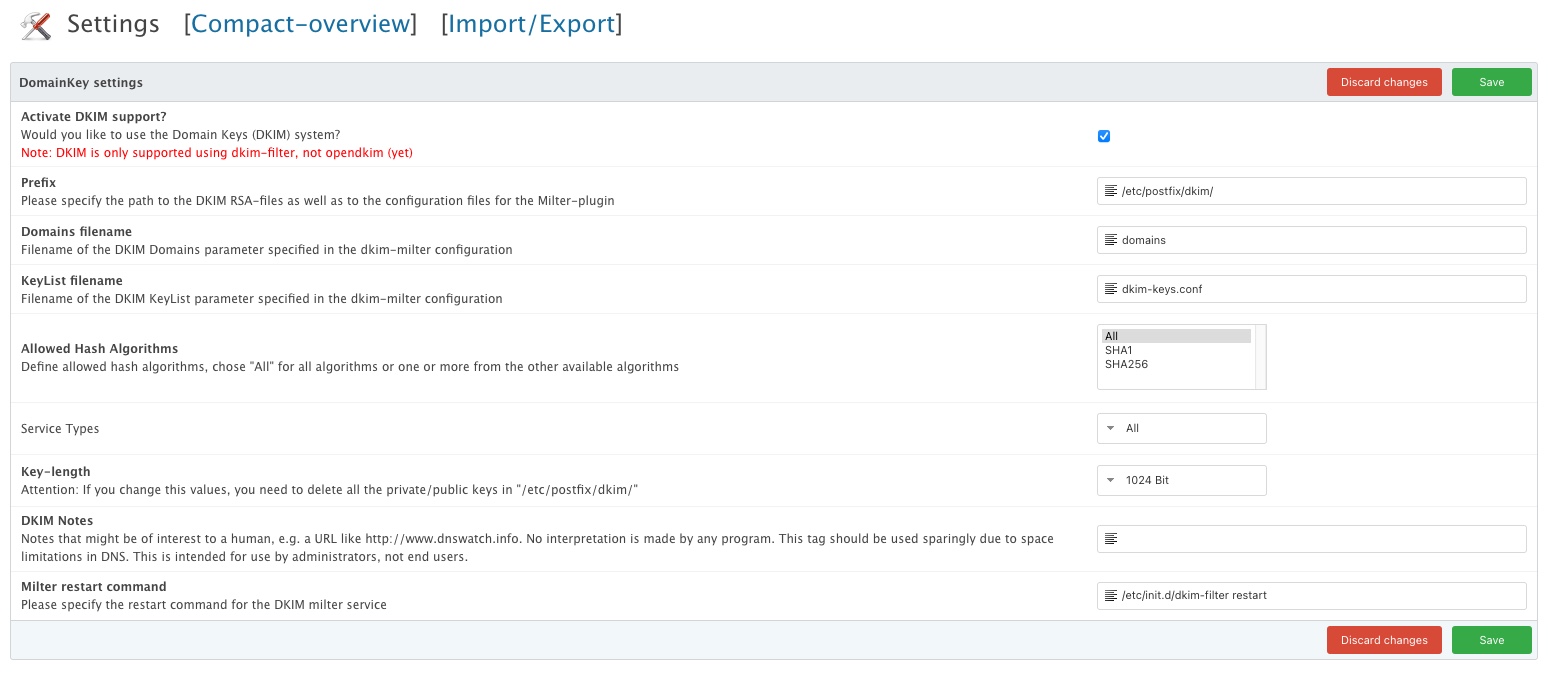
Since according to DomainKeys settings in Froxlor, only dkim-filter is supported, I'm using dkim-filter with this following config: # Log to syslog Syslog yes # Required to use local socket with MTAs that access the socket as a non- # privileged user (e.g. Postfix) UMask 002 # Sign for example.com with key in /etc/mail/dkim.key using # selector '2007' (e.g. 2007._domainkey.example.com) Domain /etc/postfix/dkim/domains #KeyFile /etc/mail/dkim.key #Selector 2007 # Common settings. See dkim-filter.conf(5) for more information. #AutoRestart no #Background yes #Canonicalization simple #DNSTimeout 5 #Mode sv #SignatureAlgorithm rsa-sha256 #SubDomains no #ADSPDiscard no #Version rfc4871 #X-Header no ############################################### # Other (less-standard) configuration options # ############################################### # # If enabled, log verification stats here #Statistics /var/run/dkim-filter/dkim-stats # # KeyList is a file containing tuples of key information. Requires # KeyFile to be unset. Each line of the file should be of the format: # sender glob:signing domain:signing key file # Blank lines and lines beginning with # are ignored. Selector will be # derived from the key's filename. KeyList /etc/postfix/dkim/dkim-keys.conf # # If enabled, will generate verification failure reports for any messages # that fail signature verification. These will be sent to the r= address # in the policy record, if any. #SendReports yes # # If enabled, will issue a Sendmail QUARANTINE for any messages that fail # signature verification, allowing them to be inspected later. #Quarantine yes # # If enabled, will check for required headers when processing messages. # At a minimum, that means From: and Date: will be required. Messages not # containing the required headers will not be signed or verified, but will # be passed through #RequiredHeaders yes Socket inet:8891@localhost On-Default accept On-BadSignature accept On-DNSError accept On-InternalError accept On-NoSignature accept On-Security accept and frolxor settings:
-
Is DKIM broken on latest Froxlor 0.10.22 update? (no key for signature)
llucps replied to llucps's question in General Discussion
Hi @d00p, Yes it did.. I just posted the new dkim.priv files as you can see... Strange that this change has broken my setup.. because it all looks good apparently, but obvisouly isn't working for me Thanks. -
Hi, I just found out the that starting on the 8th of November which I believe is when I updated to the latest 0.10.22 froxlor the DKIM fails to send the public key. Looking at the email message source: dkim=temperror (no key for signature) header.i=@xxxxxxxxx.com header.s=dkim1.priv header.b=kWkNNAzJ; I just checked the froxlor database and the public and private keys are there. I also check the /etc/postfix/dkim/ and all the keys are also there, including dkim-keys.conf which lists all domains and its keys In fact I haven't changed or modified anything related to this, not at that I'm aware of anyway. I found this post But I don't know if it's related to my problem, I also restart postfix, dkim-filter, dovecot and the same dkim=temperror (no key for signature) Are you aware if there is change on the latest froxlor update that could cause this? or any idea how else to debug this? It's really strange since nothing seems to be changed from my side. Thanks, Lluc P.D. Could it be a permissions problem? I checked the /etc/postfix/dkim/ directory and the owner is root:root. Is this correct? I don't recall changing this neither. Just in case rings a bell. OK.. could it be this change? I suspect is coming from this change.. maybe? https://github.com/Froxlor/Froxlor/commit/15a13a7783d85f77efe1619ed85bd46e9ad3935b More things: On my /etc/postfix/dkim/ I have: drwxr-xr-x 2 root root 4096 Nov 7 11:32 . drwxr-xr-x 7 root root 4096 Aug 20 11:39 .. -rw-r----- 1 root root 887 Aug 9 10:58 dkim1 -rw-r----- 1 root root 887 Nov 7 11:32 dkim1.priv -rw-r--r-- 1 root root 272 Aug 9 10:58 dkim1.public -rw-r----- 1 root root 887 Aug 9 10:58 dkim2 -rw-r----- 1 root root 887 Nov 7 11:32 dkim2.priv -rw-r--r-- 1 root root 272 Aug 9 10:58 dkim2.public -rw-r----- 1 root root 887 Aug 9 10:58 dkim3 -rw-r----- 1 root root 887 Nov 7 11:32 dkim3.priv -rw-r--r-- 1 root root 272 Aug 9 10:58 dkim3.public -rw-r----- 1 root root 887 Aug 9 10:58 dkim4 -rw-r----- 1 root root 887 Nov 7 11:32 dkim4.priv -rw-r--r-- 1 root root 272 Aug 9 10:58 dkim4.public -rw-r----- 1 root root 887 Aug 9 10:58 dkim6 -rw-r----- 1 root root 887 Nov 7 11:32 dkim6.priv -rw-r--r-- 1 root root 272 Aug 9 10:58 dkim6.public -rw-r----- 1 root root 887 Aug 9 10:58 dkim7 -rw-r----- 1 root root 887 Nov 7 11:32 dkim7.priv -rw-r--r-- 1 root root 272 Aug 9 10:58 dkim7.public which the dkim1, dkim2 etc.. are the "old" private files, and the dkim1.priv dkim2.priv etc. are the new private keys file created with the latest commit I just published above. In the dkim-keys.conf I have: *@xxxxxx.com:xxxxxxx.com:/etc/postfix/dkim/dkim1.priv *@xxxxxx.com:xxxxxxx.com:/etc/postfix/dkim/dkim2.priv *@xxxxxx.com:xxxxxxx.com:/etc/postfix/dkim/dkim3.priv *@xxxxxx.com:xxxxxxx.com:/etc/postfix/dkim/dkim4.priv *@xxxxxx.com:xxxxxxx.com:/etc/postfix/dkim/dkim5.priv *@xxxxxx.com:xxxxxxx.com:/etc/postfix/dkim/dkim6.priv *@xxxxxx.com:xxxxxxx.com:/etc/postfix/dkim/dkim7.priv Although it looks ok to me... it's pointing the the dkim*.priv files