
mrmanuel
-
Posts
20 -
Joined
-
Last visited
Everything posted by mrmanuel
-
[gelöst] "Primary script unknown" und php-fpm
mrmanuel replied to df8oe's question in German / Deutsch
Die Änderung wurde nun in das Main Repository für Apache übernommen, somit ist in Zukunft keine eigenständige Anpassung: https://github.com/Froxlor/Froxlor/pull/1006 Mit nginx und lighttp habe ich leider keine Erfahrungen. -
[gelöst] "Primary script unknown" und php-fpm
mrmanuel replied to df8oe's question in German / Deutsch
Sorry, wenn ich den Threat wieder zum Leben erwecke. Gibt es eingen Grund, wieso die Anpassung nicht im GitHub Repository durchgeführt wird? <If "-f %{SCRIPT_FILENAME}"> SetHandler "proxy:unix:/var/lib/...fpm.socket|fcgi://localhost" </If> -
Das PHP Handbuch hatte ich schon durchgeschaut. Ist bei PHP-FPM dann wohl so. Vielen Dank für deine Hilfe!
-
Das mache ich bereits. Ich habe zum Testen bei jeder Domain eine opcache.php (https://github.com/rlerdorf/opcache-status) hinterlegt. Das Script wird somit für domain-1.com bis domain-3.com mit dem User customer01 und für domain-3.com und domain-4.com mit dem User customer02 ausgeführt. Trotzdem werden alle Scripts aller PHP-FPM Pools, welche dieselbe PHP-FPM Version verwenden, in einen Topf geschmissen. Ist das Verhalten bei PHP-FPM normal? Ich habe einen anderen Server der dieselbe php.ini hat jedoch PHP-FGCI statt PHP-FPM verwendet. Dort wird korrekt pro Domain der OPcache zur Verfügung gestellt und nicht pro PHP Version. Werden die Cache Dateien nur im RAM abgelegt oder kann ich irgendwelche Berechtigungen im Filesystem prüfen?
-
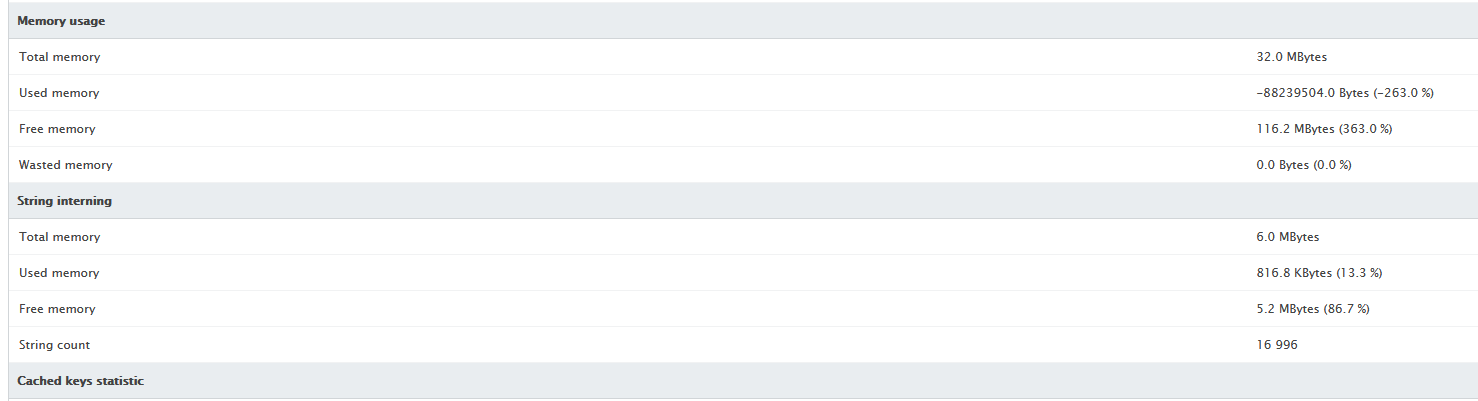
Hallo d00p, danke für deine schnelle Antwort. Leider hat das nicht funktioniert. In der domain-1.conf werden die Werte zwar geschrieben, über die OPcache Info auch angezeigt, trotzdem werden mir alle Scripts derselben PHP-FPM Version angezeigt. Das Blöde ist eben, dass ich mir bezüglich des Speicherverbrauchs nicht sicher sein kann, da ich dort solche Werte erhalte:

-
Hallo, ich würde gerne den OpCache Speicherplatz pro Pool/Domain nutzen. Aktuell wird der Speicherplatz jedoch pro PHP Konfiguration geteilt, d.h. alle Scripts der Domains welche dieselbe PHP Konfiguration verwenden werden mir im OpCache angezeigt. Laut meiner Recherche sollte der OpCache Speicherplatz nur vom jeweiligen PHP-FPM Pool genutzt werden. Da pro Domain ein PHP-FPM Pool angelegt wird, sollte dies doch nicht für alle geteilt werden? # Scripts welche im selben OpCache Speicherplatz gecached werden /var/customers/webs/customer01/domain-1.com/test-1.php /var/customers/webs/customer01/domain-2.com/test-2.php /var/customers/webs/customer01/domain-3.com/test-3.php /var/customers/webs/customer02/domain-4.com/test-4.php /var/customers/webs/customer02/domain-5.com/test-5.php # PHP-FPM Einstellungen # PHP Konfiguration php.ini settings allow_url_fopen = Off allow_url_include = Off auto_append_file = auto_globals_jit = On auto_prepend_file = bcmath.scale = 0 cli_server.color = On default_charset = "UTF-8" default_mimetype = "text/html" default_socket_timeout = 60 asp_tags = Off disable_functions = pcntl_alarm,pcntl_fork,pcntl_waitpid,pcntl_wait,pcntl_wifexited,pcntl_wifstopped,pcntl_wifsignaled,pcntl_wifcontinued,pcntl_wexitstatus,pcntl_wtermsig,pcntl_wstopsig,pcntl_signal,pcntl_signal_get_handler,pcntl_signal_dispatch,pcntl_get_last_error,pcntl_strerror,pcntl_sigprocmask,pcntl_sigwaitinfo,pcntl_sigtimedwait,pcntl_exec,pcntl_getpriority,pcntl_setpriority,pcntl_async_signals,curl_exec,curl_multi_exec,exec,passthru,popen,proc_close,proc_get_status,proc_nice,proc_open,proc_terminate,shell_exec,show_source,system display_errors = Off display_startup_errors = Off doc_root = enable_dl = Off error_reporting = E_ALL & ~E_DEPRECATED & ~E_STRICT & ~E_NOTICE expose_php = Off file_uploads = On html_errors = On ignore_repeated_errors = Off ignore_repeated_source = Off include_path = ".:{PEAR_DIR}" implicit_flush = Off ldap.max_links = -1 log_errors = On log_errors_max_len = 1024 mail.add_x_header = Off max_execution_time = 30 max_file_uploads = 20 max_input_time = 60 memory_limit = 48M {OPEN_BASEDIR_C}open_basedir = "{OPEN_BASEDIR}" output_buffering = 4096 post_max_size = 16M precision = 14 register_argc_argv = Off report_memleaks = On request_order = "GP" sendmail_path = "/usr/sbin/sendmail -t -i -f {CUSTOMER_EMAIL}" serialize_precision = -1 session.auto_start = 0 session.cache_expire = 180 session.cache_limiter = nocache session.cookie_domain = session.cookie_httponly = session.cookie_lifetime = 0 session.cookie_path = / session.cookie_samesite = session.gc_divisor = 1000 session.gc_maxlifetime = 1440 session.gc_probability = 0 session.name = PHPSESSID session.referer_check = session.save_handler = files session.save_path = "{TMP_DIR}" session.serialize_handler = php session.sid_bits_per_character = 5 session.sid_length = 26 session.trans_sid_tags = "a=href,area=href,frame=src,form=" session.use_cookies = 1 session.use_only_cookies = 1 session.use_strict_mode = 0 session.use_trans_sid = 0 short_open_tag = On upload_max_filesize = 16M upload_tmp_dir = "{TMP_DIR}" variables_order = "GPCS" apc.enabled=0 apc.shm_size=1M opcache.enable=1 opcache.memory_consumption=16 opcache.interned_strings_buffer=8 opcache.max_accelerated_files=16229 opcache.validate_timestamps=1 opcache.save_comments=1 opcache.revalidate_freq=60 opcache.fast_shutdown=1 opcache.restrict_api = "{DOCUMENT_ROOT}" # PHP-FPM Pools welche erstellt werden root@froxlorserver:/etc/php/7.4/fpm/pool.d# ls -l total 20 -rw-r--r-- 1 root root 3420 Dec 21 19:49 domain-1.conf -rw-r--r-- 1 root root 3528 Dec 21 19:49 domain-2.conf -rw-r--r-- 1 root root 3454 Dec 21 19:49 domain-3.conf -rw-r--r-- 1 root root 3480 Dec 21 19:49 domain-4.conf -rw-r--r-- 1 root root 3096 Dec 21 19:49 domain-5.conf # domain-1.conf (domain-2.conf und domain-3.conf ist bis auf den Domainnamen gleich) root@froxlorserver:/etc/php/7.4/fpm/pool.d# cat domain-1.com.conf ;PHP-FPM configuration for "domain-1.com" created on 2021.12.21 19:49:47 [domain-1.com] listen = /var/lib/apache2/fastcgi/1-customer01-domain-1.com-php-fpm.socket listen.owner = customer01 listen.group = customer01 listen.mode = 0660 user = customer01 group = customer01 pm = dynamic pm.max_children = 10 pm.start_servers = 4 pm.min_spare_servers = 2 pm.max_spare_servers = 4 pm.max_requests = 200 ;chroot = /var/customers/webs/customer01/domain-1.com/ security.limit_extensions = .php env[PATH] = /usr/local/bin:/usr/bin:/bin env[TMP] = /var/customers/tmp/customer01/ env[TMPDIR] = /var/customers/tmp/customer01/ env[TEMP] = /var/customers/tmp/customer01/ php_admin_value[upload_tmp_dir] = /var/customers/tmp/customer01/ php_admin_flag[allow_url_fopen] = Off php_admin_flag[allow_url_include] = Off php_value[auto_append_file] = php_value[auto_prepend_file] = php_value[default_charset] = "UTF-8" php_flag[asp_tags] = Off php_admin_value[disable_functions] = pcntl_alarm,pcntl_fork,pcntl_waitpid,pcntl_wait,pcntl_wifexited,pcntl_wifstopped,pcntl_wifsignaled,pcntl_wifcontinued,pcntl_wexitstatus,pcntl_wtermsig,pcntl_wstopsig,pcntl_signal,pcntl_signal_get_handler,pcntl_signal_dispatch,pcntl_get_last_error,pcntl_strerror,pcntl_sigprocmask,pcntl_sigwaitinfo,pcntl_sigtimedwait,pcntl_exec,pcntl_getpriority,pcntl_setpriority,pcntl_async_signals,curl_multi_exec,exec,passthru,popen,proc_close,proc_get_status,proc_nice,proc_open,proc_terminate,shell_exec,show_source,system php_flag[display_errors] = Off php_flag[display_startup_errors] = Off php_admin_flag[enable_dl] = Off php_value[error_reporting] = E_ALL & ~E_DEPRECATED & ~E_STRICT & ~E_NOTICE php_admin_flag[expose_php] = Off php_admin_flag[file_uploads] = On php_flag[html_errors] = On php_admin_flag[ignore_repeated_errors] = Off php_admin_flag[ignore_repeated_source] = Off php_value[include_path] = ".:/usr/share/php/" php_flag[log_errors] = On php_admin_flag[log_errors] = On php_value[log_errors_max_len] = 1024 php_flag[mail.add_x_header] = Off php_value[max_execution_time] = 30 php_admin_value[max_input_time] = 60 php_admin_value[memory_limit] = 48M php_admin_value[open_basedir] = "/var/customers/webs/customer01/domain-1.com:/var/customers/tmp/customer01:/usr/share/php:/tmp" php_admin_value[output_buffering] = 4096 php_admin_value[post_max_size] = 16M php_admin_value[precision] = 14 php_admin_flag[register_argc_argv] = Off php_admin_flag[report_memleaks] = On php_admin_value[sendmail_path] = "/usr/sbin/sendmail -t -i -f support@domain.tld" php_value[session.auto_start] = 0 php_value[session.cookie_domain] = php_value[session.cookie_lifetime] = 0 php_value[session.cookie_path] = / php_admin_value[session.gc_divisor] = 1000 php_admin_value[session.gc_probability] = 0 php_value[session.name] = PHPSESSID php_value[session.serialize_handler] = php php_flag[session.use_cookies] = 1 php_flag[short_open_tag] = On php_value[upload_max_filesize] = 16M php_admin_value[variables_order] = "GPCS" php_admin_flag[opcache.enable] = 1 php_admin_value[opcache.memory_consumption] = 256 php_admin_value[opcache.interned_strings_buffer] = 8 php_admin_value[opcache.max_accelerated_files] = 16229 php_admin_flag[opcache.validate_timestamps] = 1 php_admin_flag[opcache.save_comments] = 1 php_admin_value[opcache.revalidate_freq] = 60 php_admin_flag[opcache.fast_shutdown] = 1 php_admin_value[opcache.restrict_api] = "/var/customers/webs/customer01/domain-1.com/" php_admin_value[session.save_path] = /var/customers/tmp/customer01/ # domain-4.conf (domain-5.conf ist bis auf den Domainnamen gleich) root@froxlorserver:/etc/php/7.4/fpm/pool.d# cat domain-4.com.conf ;PHP-FPM configuration for "domain-4.com" created on 2021.12.21 19:49:47 [domain-4.com] listen = /var/lib/apache2/fastcgi/1-customer02-domain-4.com-php-fpm.socket listen.owner = customer02 listen.group = customer02 listen.mode = 0660 user = customer02 group = customer02 pm = dynamic pm.max_children = 10 pm.start_servers = 4 pm.min_spare_servers = 2 pm.max_spare_servers = 4 pm.max_requests = 200 ;chroot = /var/customers/webs/customer02/domain-4.com/ security.limit_extensions = .php env[PATH] = /usr/local/bin:/usr/bin:/bin env[TMP] = /var/customers/tmp/customer02/ env[TMPDIR] = /var/customers/tmp/customer02/ env[TEMP] = /var/customers/tmp/customer02/ php_admin_value[upload_tmp_dir] = /var/customers/tmp/customer02/ php_admin_flag[allow_url_fopen] = Off php_admin_flag[allow_url_include] = Off php_value[auto_append_file] = php_value[auto_prepend_file] = php_value[default_charset] = "UTF-8" php_flag[asp_tags] = Off php_admin_value[disable_functions] = pcntl_alarm,pcntl_fork,pcntl_waitpid,pcntl_wait,pcntl_wifexited,pcntl_wifstopped,pcntl_wifsignaled,pcntl_wifcontinued,pcntl_wexitstatus,pcntl_wtermsig,pcntl_wstopsig,pcntl_signal,pcntl_signal_get_handler,pcntl_signal_dispatch,pcntl_get_last_error,pcntl_strerror,pcntl_sigprocmask,pcntl_sigwaitinfo,pcntl_sigtimedwait,pcntl_exec,pcntl_getpriority,pcntl_setpriority,pcntl_async_signals,curl_multi_exec,exec,passthru,popen,proc_close,proc_get_status,proc_nice,proc_open,proc_terminate,shell_exec,show_source,system php_flag[display_errors] = Off php_flag[display_startup_errors] = Off php_admin_flag[enable_dl] = Off php_value[error_reporting] = E_ALL & ~E_DEPRECATED & ~E_STRICT & ~E_NOTICE php_admin_flag[expose_php] = Off php_admin_flag[file_uploads] = On php_flag[html_errors] = On php_admin_flag[ignore_repeated_errors] = Off php_admin_flag[ignore_repeated_source] = Off php_value[include_path] = ".:/usr/share/php/" php_flag[log_errors] = On php_admin_flag[log_errors] = On php_value[log_errors_max_len] = 1024 php_flag[mail.add_x_header] = Off php_value[max_execution_time] = 30 php_admin_value[max_input_time] = 60 php_admin_value[memory_limit] = 48M php_admin_value[open_basedir] = "/var/customers/webs/customer02/domain-4.com:/var/customers/tmp/customer02:/usr/share/php:/tmp" php_admin_value[output_buffering] = 4096 php_admin_value[post_max_size] = 16M php_admin_value[precision] = 14 php_admin_flag[register_argc_argv] = Off php_admin_flag[report_memleaks] = On php_admin_value[sendmail_path] = "/usr/sbin/sendmail -t -i -f support@domain.tld" php_value[session.auto_start] = 0 php_value[session.cookie_domain] = php_value[session.cookie_lifetime] = 0 php_value[session.cookie_path] = / php_admin_value[session.gc_divisor] = 1000 php_admin_value[session.gc_probability] = 0 php_value[session.name] = PHPSESSID php_value[session.serialize_handler] = php php_flag[session.use_cookies] = 1 php_flag[short_open_tag] = On php_value[upload_max_filesize] = 16M php_admin_value[variables_order] = "GPCS" php_admin_flag[opcache.enable] = 1 php_admin_value[opcache.memory_consumption] = 256 php_admin_value[opcache.interned_strings_buffer] = 8 php_admin_value[opcache.max_accelerated_files] = 16229 php_admin_flag[opcache.validate_timestamps] = 1 php_admin_flag[opcache.save_comments] = 1 php_admin_value[opcache.revalidate_freq] = 60 php_admin_flag[opcache.fast_shutdown] = 1 php_admin_value[opcache.restrict_api] = "/var/customers/webs/customer02/domain-4.com/" php_admin_value[session.save_path] = /var/customers/tmp/customer02/ Sollten noch Infos benötigt werden, kann ich diese gerne nachreichen. Vielen Dank im Voraus! Grüße, Manuel
-
Installationsschwierigkeiten von PHP-FPM mit Apache
mrmanuel replied to mrmanuel's question in German / Deutsch
Ok. Danke nochmal für die schnelle Hilfe -
Installationsschwierigkeiten von PHP-FPM mit Apache
mrmanuel replied to mrmanuel's question in German / Deutsch
Alles klar. Hast du noch Empfehlungen auf die man achten sollte wie libnss-extrausers zu nutzen statt libnss-mysql? Vielen Dank -
Installationsschwierigkeiten von PHP-FPM mit Apache
mrmanuel replied to mrmanuel's question in German / Deutsch
Ich habe nun mehrmals eine komplette Neuinstallation zum Testen durchgeführt. Ich habe Froxlor installiert, über Web konfiguriert und anschließend den Befehl php /var/www/froxlor//install/scripts/config-services.php --froxlor-dir=/var/www/froxlor/ --create ausgeführt um die restlichen Konfigurationen vorzunehmen. Hier scheint der Schritt zu fehlen, dass der froxlorlocal Benutzer und Gruppe angelegt wird, da die Berechtigungen auf den Ordner /var/custoers/tmp/froxlor.panel falsch gesetzt sind und der Benutzer/Gruppe froxlorlocal die "falsche" ID hat: Nov 25 18:47:45 srvweb01 php7.4-fpm[23596]: NOTICE: Not enabling PHP 7.4 FPM by default. Nov 25 18:47:45 srvweb01 php7.4-fpm[23597]: NOTICE: To enable PHP 7.4 FPM in Apache2 do: Nov 25 18:47:45 srvweb01 php7.4-fpm[23598]: NOTICE: a2enmod proxy_fcgi setenvif Nov 25 18:47:45 srvweb01 php7.4-fpm[23599]: NOTICE: a2enconf php7.4-fpm Nov 25 18:47:45 srvweb01 php7.4-fpm[23600]: NOTICE: You are seeing this message because you have apache2 package installed. Nov 25 18:47:45 srvweb01 systemd[1]: Reloading. Nov 25 18:47:45 srvweb01 systemd[1]: Reloading. Nov 25 18:47:45 srvweb01 systemd[1]: Starting The PHP 7.4 FastCGI Process Manager... ░░ Subject: A start job for unit php7.4-fpm.service has begun execution ░░ Defined-By: systemd ░░ Support: https://www.debian.org/support ░░ ░░ A start job for unit php7.4-fpm.service has begun execution. ░░ ░░ The job identifier is 1284. Nov 25 18:47:45 srvweb01 php-fpm7.4[23652]: [25-Nov-2021 18:47:45] ERROR: [pool srvweb01.hro.md0.eu] cannot get uid for user 'froxlorlocal' Nov 25 18:47:45 srvweb01 php-fpm7.4[23652]: [25-Nov-2021 18:47:45] ERROR: FPM initialization failed Nov 25 18:47:45 srvweb01 systemd[1]: php7.4-fpm.service: Main process exited, code=exited, status=78/CONFIG ░░ Subject: Unit process exited ░░ Defined-By: systemd ░░ Support: https://www.debian.org/support ░░ ░░ An ExecStart= process belonging to unit php7.4-fpm.service has exited. ░░ ░░ The process' exit code is 'exited' and its exit status is 78. Nov 25 18:47:45 srvweb01 systemd[1]: php7.4-fpm.service: Failed with result 'exit-code'. ░░ Subject: Unit failed ░░ Defined-By: systemd ░░ Support: https://www.debian.org/support ░░ ░░ The unit php7.4-fpm.service has entered the 'failed' state with result 'exit-code'. Nov 25 18:47:45 srvweb01 systemd[1]: Failed to start The PHP 7.4 FastCGI Process Manager. ░░ Subject: A start job for unit php7.4-fpm.service has failed ░░ Defined-By: systemd ░░ Support: https://www.debian.org/support ░░ ░░ A start job for unit php7.4-fpm.service has finished with a failure. ░░ ░░ The job identifier is 1284 and the job result is failed. Nov 25 18:47:45 srvweb01 groupadd[23685]: group added to /etc/group: name=froxlorlocal, GID=1000 Nov 25 18:47:45 srvweb01 groupadd[23685]: group added to /etc/gshadow: name=froxlorlocal Nov 25 18:47:45 srvweb01 groupadd[23685]: new group: name=froxlorlocal, GID=1000 Nov 25 18:47:45 srvweb01 useradd[23692]: new user: name=froxlorlocal, UID=1000, GID=1000, home=/home/froxlorlocal, shell=/bin/false, from=/dev/pts/0 Nov 25 18:47:45 srvweb01 systemd[1]: Stopping The Apache HTTP Server... ░░ Subject: A stop job for unit apache2.service has begun execution ░░ Defined-By: systemd ░░ Support: https://www.debian.org/support root@srvweb01:~# ls -l /var/customers/tmp/ total 4 drwxr-x--- 2 root root 4096 Nov 25 18:46 froxlor.panel root@srvweb01:~# cat /etc/passwd | grep froxlorlocal froxlorlocal:x:1000:1000::/home/froxlorlocal:/bin/false Laut Anleitung sollte der Benutzer und Gruppe mit der ID 9999 angelegt werden: addgroup --gid 9999 froxlorlocal adduser --no-create-home --uid 9999 --ingroup froxlorlocal --shell /bin/false --disabled-password --gecos '' froxlorlocal Vermutlich ein Bug? -
Installationsschwierigkeiten von PHP-FPM mit Apache
mrmanuel replied to mrmanuel's question in German / Deutsch
Vielen Dank für die schnelle Antwort. Da dies meine erste Installation mit PHP-FPM ist, habe ich leider keine Ahnung welche Einstellungen ich vorher alles setzen muss und kann somit leider nur nach Anleitung vorgehen. Würde gerne Apache mit PHP-FPM nach den "best practice" Einstellungen installieren. Hast du vielleicht eine Liste welche das sind? Würde sonst nur folgendes konfigurieren: Settings --> System Settings --> Use libnss-extrausers instead of libnss-mysql --> tick checkbox Settings --> PHP-FPM - Activated: Yes Settings --> Froxlor VirtualHost settings --> Enable PHP-FPM for the Froxlor vHost --> tick checkbox -
Hallo, ich bin gerade dabei einen neuen Froxlor (0.10.30-1) Webserver aufzusetzen und komme leider nicht weiter, da die Anleitung leider etwas in die Jahre gekommen ist. Als Betriebssystem verwende ich Debian Bullseye 11.1.0 amd64. Ich habe Froxlor wie folgt konfiguriert: Install froxlor on debian: Punkte 1 - 4 Symbolischen Link erstellt um Froxlor über HTTP/HTTPS erreichen zu können: ln -s /var/www/froxlor/ /var/www/html/froxlor Froxlor über die Web UI installiert und die Services über Shell automatisch konfiguriert: php /var/www/froxlor//install/scripts/config-services.php --froxlor-dir=/var/www/froxlor/ --create choose distribution [bullseye]: Enter choose service [apache24]: Enter choose service [bind]: x choose service [postfix_dovecot]: x choose service [dovecot_postfix2]: x choose service [proftpd]: Enter Select every service you need. Enter empty value when done choose service: cron choose service: awstats choose service: libnssextrausers choose service: logrotate choose service: php-fpm choose service: Enter choose output-filename [/tmp/froxlor-config-20211125.json]: Enter Do you want to apply the config now? [y/N]: Y --- Configuring: FTP --- Do you want to continue? [Y/n] Enter Soweit so gut. Während der Konfiguration habe ich keine Fehler erhalten. Nun wollte ich anhang der Anleitung apache2 with php fpm PHP-FPM konfigurieren. Schritt 2 wurde vermutlich mit der Autokonfiguration über die Shell ausgeführt, jedoch fehlt z.B. das Modul fastcgi in Apache. Bei Schritt 3 weiß ich leider nicht woher ich die Inhalte von /etc/libnss-mysql-root.cfg und /etc/libnss-mysql.cfg herbekommen soll. Die Datei /etc/nsswitch.conf ist bereits vorhanden. Wenn ich im Froxlor Panel unter "System -> Configuration -> Debian Bullseye (11.x) - Others (System) - libnss-extrausers (required for FCGID/php-fpm/mpm-itk)" auswähle erscheint mir nur die Konfiguration von /etc/nsswitch.conf. Bei Schritt 4 gibt es die Datei /etc/apache2/mods-available/fastcgi.conf nicht, da in Schritt 2 das Modul nicht installiert/aktiviert wurde. Wie kann ich nun PHP-FPM auf einem aktuellen System installieren? Gibt es eine aktuelle Anleitung die ich vielleicht nicht gefunden habe? Vielen Dank im Voraus