

Datenfalke
-
Posts
38 -
Joined
-
Last visited
-
Days Won
2
Posts posted by Datenfalke
-
-
Ok, danke für die Hilfe!
# apt remove nscd
Reading package lists... Done
Building dependency tree
Reading state information... Done
The following packages will be REMOVED:
 nscd
Auch nach Reboot funktioniert es noch. Hake ich unter "keine Ahnung was da los war" ab 😄
-
Ich habe testweise falsches Passwort in /etc/libnss-mysql.cfg eingegeben... funktioniert immernoch :-)
Ich vermute, dass nun libnss-extrausers wieder funktioniert.
-
 1
1
-
-
Drin stehen tut das vom Template vorgegebene:
# Make sure that `passwd`, `group` and `shadow` have extrausers in their lines
# You should place extrausers at the end, so that it is queried after the other mechanisams
#
passwd:         compat extrausers
group:          compat extrausers
shadow:         compat extrausers

hosts:       files dns
networks:    files dns

services:    db files
protocols:   db files
rpc:         db files
ethers:      db files
netmasks:    files
netgroup:    files
bootparams:  files

automount:   files
aliases:     files
In den extrausers steht denke ich alles korrekt:
# l /var/lib/extrausers/
total 20
drwxr-xr-x  2 root root 4096 Jul 16  2019 .
drwxr-xr-x 44 root root 4096 Aug 19  2019 ..
-rw-r--r--  1 root root  160 Jul 23 23:00 group
-rw-r--r--  1 root root  807 Jul 23 23:00 passwd
-rw-r-----  1 root root  718 Jul 23 23:00 shadow
cat /var/lib/extrausers/group
user1:x:10002:user1,www-data,froxlorlocal
user2:x:10003:user2,www-data,user2ftp1,user2ftp2,user2ftp3,user2ftp6,user2ftp7,user2ftp8,froxlorlocal
cat /var/lib/extrausers/passwd
user1:x:10002:10002:User1:/var/customers/webs/user1/:/bin/false
user2:x:10003:10003:User2:/var/customers/webs/user2/:/bin/false
user2ftp1:x:10003:10003:Loovee:/var/customers/webs/user2/xxxxxx:/bin/false
user2ftp2:x:10003:10003:Loovee:/var/customers/webs/user2/:/bin/false
user2ftp3:x:10003:10003:Loovee:/var/customers/webs/user2/xxxxxx:/bin/false
user2ftp6:x:10003:10003:Loovee:/var/customers/webs/user2/xxxxxx:/bin/false
user2ftp7:x:10003:10003:Loovee:/var/customers/webs/user2/xxxxxx:/bin/false
user2ftp8:x:10003:10003:Loovee:/var/customers/webs/user2/xxxxxx:/bin/false
cat /var/lib/extrausers/shadow
user1:xxxx:18465:0:99999:7:::
user2:xxxx:18465:0:99999:7:::
user2ftp1:xxxx:18465:0:99999:7:::
usw.
-
Ahja danke für den Hinweis!
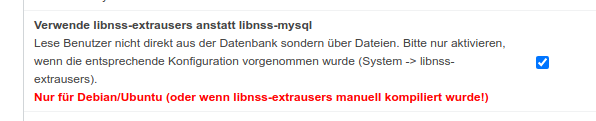
Das libnss-extrausers sollte benutzt werden, ist (und war) angehakt, und ich habe (und hatte davor) die Template-Anweisungen durchgeführt, sprich /etc/nsswitch.conf existiert wie vorgegeben.
-rw-r--r-- 1 root root 507 Jul 23 22:20 /etc/nsswitch.conf
Woran erkennt man ob es bei libnss-extrausers Fehler gibt bzw. das es läuft?

-
Info für andere mit der PHP-FPM Fehlermeldung
Permission denied: AH02454: FCGI: attempt to connect to Unix domain socket /var/lib/
apache2/fastcgi/...Nachdem ich ein Debian dist-upgrade mit einem Froxlor Update drin durchgeführt hatte, gab es bei allen Customer-Domains obigen Fehler. Vorher lief die PHP-FPM Geschichte schon seit langem.
Unter /var/lib/apache2/fastcgi/ sind die sockets mit den korrekten customer Benutzern angelegt. Ändere ich den Benutzer auf www-data läuft es wieder.
Lösung:
In /etc/libnss-mysql.cfg stand nicht mehr das benötigte, wie folgt:
getpwnam    SELECT username,'x',uid,gid,'Froxlor Customer',homedir,shell \
            FROM ftp_users \
            WHERE username='%1$s' \
            AND login_enabled = 'Y' \
            ORDER BY LENGTH(username) \
            LIMIT 1
getpwuid    SELECT username,'x',uid,gid,'Froxlor Customer',homedir,shell \
            FROM ftp_users \
            WHERE uid='%1$u' \
            AND login_enabled = 'Y' \
            ORDER BY LENGTH(username) \
            LIMIT 1
getspnam    SELECT username,password,FLOOR(UNIX_TIMESTAMP()/86400-1),'1','99999','7','-1','-1','0' \
            FROM ftp_users \
            WHERE username='%1$s' \
            AND login_enabled = 'Y' \
            ORDER BY LENGTH(username) \
            LIMIT 1
getpwent    SELECT username,'x',uid,gid,'Froxlor Customer',homedir,shell \
            FROM ftp_users
getspent    SELECT username,password,FLOOR(UNIX_TIMESTAMP()/86400-1),'1','99999','7','-1','-1','0' \
            FROM ftp_users
getgrnam    SELECT groupname,'x',gid \
            FROM ftp_groups \
            WHERE groupname='%1$s' \
            LIMIT 1
getgrgid    SELECT groupname,'x',gid \
            FROM ftp_groups \
            WHERE gid='%1$u' \
            LIMIT 1
getgrent    SELECT groupname,'x',gid \
            FROM ftp_groups
memsbygid   SELECT members \
            FROM ftp_groups \
            WHERE gid='%1$u'
gidsbymem   SELECT CONCAT_WS(',', gid) as gid \
            FROM ftp_groups \
            WHERE FIND_IN_SET('%1$s', members)

host            127.0.0.1
database        froxlor
username        froxlor
password        xxxxxxxxxxxx
port        3306
#socket         /var/run/mysqld/mysqld.sock
Es stand fälschlicherweise folgendes drin - warum kann ich nicht sagen:getpwnam SELECT username,'x',uid,gid,gecos,homedir,shell \ FROM users \ WHERE username='%1$s' \ LIMIT 1 getpwuid SELECT username,'x',uid,gid,gecos,homedir,shell \ FROM users \ WHERE uid='%1$u' \ LIMIT 1 getspnam SELECT username,password,lstchg,min,max,warn,inact,expire,flag \ FROM users \ WHERE username='%1$s' \ LIMIT 1 getpwent SELECT username,'x',uid,gid,gecos,homedir,shell \ FROM users getspent SELECT username,password,lstchg,min,max,warn,inact,expire,flag \ FROM users getgrnam SELECT name,password,gid \ FROM groups \ WHERE name='%1$s' \ LIMIT 1 getgrgid SELECT name,password,gid \ FROM groups \ WHERE gid='%1$u' \ LIMIT 1 getgrent SELECT name,password,gid \ FROM groups memsbygid SELECT username \ FROM grouplist \ WHERE gid='%1$u' gidsbymem SELECT gid \ FROM grouplist \ WHERE username='%1$s' host localhost database auth username nss-user password userpass #socket /var/run/mysqld/mysqld.sock #port 3306
-
I moved teh thread regarding autoresponder here http://forum.froxlor.org/index.php/topic/12604-autoresponder/
-
Ok, thank you!
Just found this one: https://github.com/pmuch/rcb-pfa-autoresponder
If I got it right http://postfixadmin.sourceforge.net/ is an requirement for the roundcube plugin.Anybody with experiences with this roundcube plugin?
Here is a tutorial with some information:
-
Is it possible to migrate from courier to dovecot without problems?
-
Thank you for the information! I will try it.
-
Thank you for the new release!
What can be done if I need the email autoresponder? I know that my customers will ask for them as soon as holiday time is coming.Do you have already something in mind what is possible to implement?
Rechteproblem? nach Aktivierung php-fpm
in German / Deutsch
Posted
Nur zur Info:
Ich hatte gerade das gleiche Problem mit "Permission denied: AH02454: FCGI: attempt to connect to Unix domain socket" nach einem Update auf 0.10.23.1 (absofort PHP 7.3 required).
Als ersten Workaround half chmod 777 /var/lib/apache2/fastcgi/*
Als ich dann nachgeschaut habe, sind die vermutlich fehlenden extra-Gruppen in /var/lib/extrausers/groups drin, denn jetzt funktioniert es auch ohne chmod 777 und den normalen Rechten srw-rw----
Ich kann mir auch nicht wirklich erklären, warum es plötzlich nicht funktionierte, wobei es mit der Umstellung der CLI default PHP Version zusammenhing.
Zum Glück fand ich diesen Artikel, so dass ich nun doch den Abschluss 2020 feiern kann 🙂 Prost und guten Rutsch allen Froxlern und Danke an d00p für die vielen Fortschritte!