
schnudeldudel
-
Posts
13 -
Joined
-
Last visited
schnudeldudel's Achievements






-
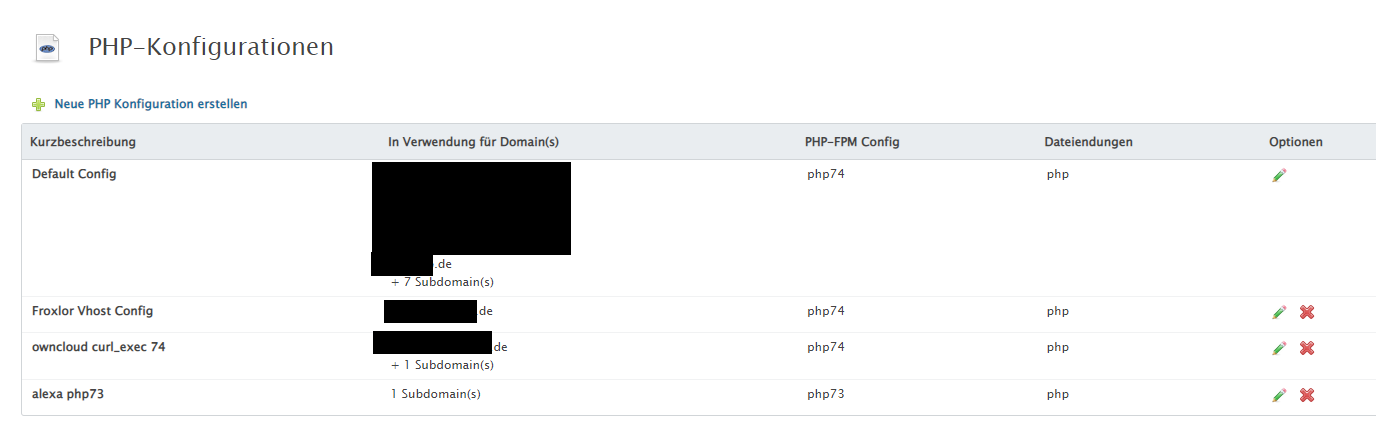
Hallo Froxlor-Community, im Admin Interface kann man sich die versch. PHP Konfigs anzeigen lassen, allerdings ist die Liste dort verkürzt. Gibt es eine Möglichkeit, sich alle Domains und Subdomains mit vollem Namen auflisten zu lassen mit der jeweils hinterlegte PHP Konfig? Das wäre gerade bei einem Upgrad der PHP Version sehr hilfreich. Aber vielleicth übersehe ich auch etwas 🙂 Danke!

-
RSS feed für das Froxlor forum hier
schnudeldudel replied to schnudeldudel's question in German / Deutsch
Nice. Wird leider in der mobile-Ansicht nicht angezeigt. Nichts für ungut. 😀 -
Hallo, Waere es möglich RSS Feeds für neue Forumsbeiträge zu erstellen. Nach meiner Recherche zur verwendeten Forumssoftware sollte das Recht einfach möglich/aktivierbar sein?! Danke. Gruss
-
gelöst PHP-FPM Konfiguration lässt sich nicht löschen
schnudeldudel replied to schnudeldudel's question in German / Deutsch
Danke. -
gelöst PHP-FPM Konfiguration lässt sich nicht löschen
schnudeldudel posted a question in German / Deutsch
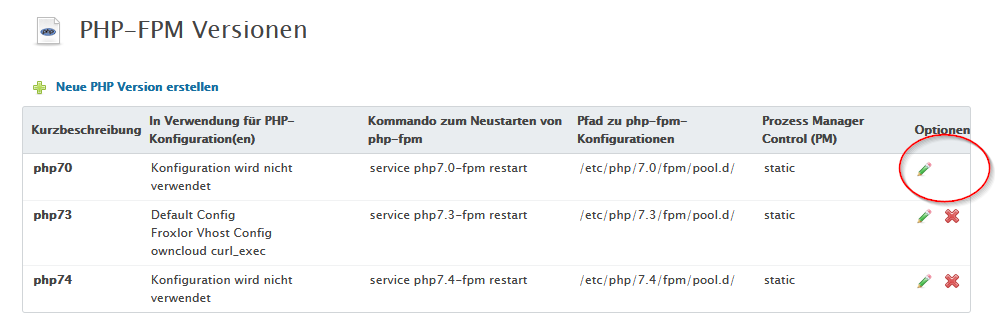
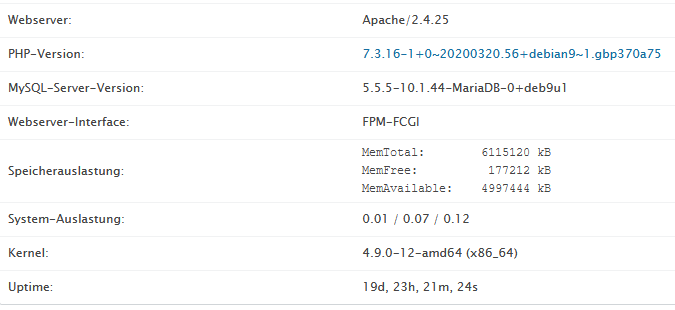
Hallo zusammen, ist es bekannt, dass man die "erst" PHP-FPM Version nicht löschen kann. Hintergrund: Über die Zeit sind neue PHP versionen erschienen und ich würde gern die php70 entfernen (bzw. die Versionen die ich nicht nutze). In der GUI kann man aber nicht alle löschen - auch wenn diese nicht benutzt werden - bei mir ist es die "php70" Konfig. Original-Screenshot aus meiner Konfig: Danke für Tipps dazu. Gruss. Meine Froxlor-Konfig:
-
Perfekt. Das war es! DANKE!!!! sollte nun passen! Wäre das evtl. etwas, was man irgendwie prüfen kann innerhalb froxlor...so dass andere nicht in das gleiche Problem laufen...? gruss
-
Hi d00p, hier mal der output (Domainnamen hab ich umbenannt): [root@meinserver /var/log/apache2]# php /var/www/html/froxlor/scripts/froxlor_master_cronjob.php --debug --force [information] TasksCron: Searching for tasks to do [information] Running Let's Encrypt cronjob prior to regenerating webserver config files [information] Requesting/renewing Let's Encrypt certificates [information] Updating certificate for MEINEDOMAIN.de [information] Adding SAN entry: MEINEDOMAIN.de [information] Adding SAN entry: www.MEINEDOMAIN.de [information] Checking for LetsEncrypt client upgrades before renewing certificates: [Mo 20. Apr 20:07:06 CEST 2020] Already uptodate! [Mo 20. Apr 20:07:06 CEST 2020] Upgrade success! [Mo 20. Apr 20:07:06 CEST 2020] Removing cron job [Mo 20. Apr 20:07:06 CEST 2020] Lets find script dir. [Mo 20. Apr 20:07:06 CEST 2020] _SCRIPT_='/root/.acme.sh/acme.sh' [Mo 20. Apr 20:07:06 CEST 2020] _script='/root/.acme.sh/acme.sh' [Mo 20. Apr 20:07:06 CEST 2020] _script_home='/root/.acme.sh' [Mo 20. Apr 20:07:06 CEST 2020] Using config home:/root/.acme.sh [Mo 20. Apr 20:07:06 CEST 2020] Using server: https://acme-v02.api.letsencrypt.org/directory [Mo 20. Apr 20:07:06 CEST 2020] Running cmd: renew [Mo 20. Apr 20:07:06 CEST 2020] Using config home:/root/.acme.sh [Mo 20. Apr 20:07:06 CEST 2020] ACME_DIRECTORY='https://acme-v02.api.letsencrypt.org/directory' [Mo 20. Apr 20:07:06 CEST 2020] DOMAIN_PATH='/root/.acme.sh/MEINEDOMAIN.de' [debug] https://github.com/acmesh-official/acme.sh v2.8.6 [Mo 20. Apr 20:07:06 CEST 2020] Renew: 'MEINEDOMAIN.de' [Mo 20. Apr 20:07:06 CEST 2020] 'MEINEDOMAIN.de' is not a issued domain, skip. [information] Updated Let's Encrypt certificate for MEINEDOMAIN.de [information] Updating certificate for NOCHNEDOMAIN.de [information] Adding SAN entry: NOCHNEDOMAIN.de [information] Adding SAN entry: www.NOCHNEDOMAIN.de [Mo 20. Apr 20:07:06 CEST 2020] Lets find script dir. [Mo 20. Apr 20:07:06 CEST 2020] _SCRIPT_='/root/.acme.sh/acme.sh' [Mo 20. Apr 20:07:06 CEST 2020] _script='/root/.acme.sh/acme.sh' [Mo 20. Apr 20:07:06 CEST 2020] _script_home='/root/.acme.sh' [Mo 20. Apr 20:07:06 CEST 2020] Using config home:/root/.acme.sh [Mo 20. Apr 20:07:06 CEST 2020] Using server: https://acme-v02.api.letsencrypt.org/directory [Mo 20. Apr 20:07:06 CEST 2020] Running cmd: renew [Mo 20. Apr 20:07:06 CEST 2020] Using config home:/root/.acme.sh [Mo 20. Apr 20:07:06 CEST 2020] ACME_DIRECTORY='https://acme-v02.api.letsencrypt.org/directory' [Mo 20. Apr 20:07:06 CEST 2020] DOMAIN_PATH='/root/.acme.sh/NOCHNEDOMAIN.de' [debug] https://github.com/acmesh-official/acme.sh v2.8.6 [Mo 20. Apr 20:07:06 CEST 2020] Renew: 'NOCHNEDOMAIN.de' [Mo 20. Apr 20:07:06 CEST 2020] 'NOCHNEDOMAIN.de' is not a issued domain, skip. [information] Updated Let's Encrypt certificate for NOCHNEDOMAIN.de [information] Updating certificate for phpmyadmin.MEINEDOMAIN.de [information] Adding SAN entry: phpmyadmin.MEINEDOMAIN.de [Mo 20. Apr 20:07:06 CEST 2020] Lets find script dir. [Mo 20. Apr 20:07:06 CEST 2020] _SCRIPT_='/root/.acme.sh/acme.sh' [Mo 20. Apr 20:07:06 CEST 2020] _script='/root/.acme.sh/acme.sh' [Mo 20. Apr 20:07:06 CEST 2020] _script_home='/root/.acme.sh' [Mo 20. Apr 20:07:06 CEST 2020] Using config home:/root/.acme.sh [Mo 20. Apr 20:07:06 CEST 2020] Using server: https://acme-v02.api.letsencrypt.org/directory [Mo 20. Apr 20:07:06 CEST 2020] Running cmd: renew [Mo 20. Apr 20:07:06 CEST 2020] Using config home:/root/.acme.sh [Mo 20. Apr 20:07:06 CEST 2020] ACME_DIRECTORY='https://acme-v02.api.letsencrypt.org/directory' [Mo 20. Apr 20:07:06 CEST 2020] DOMAIN_PATH='/root/.acme.sh/phpmyadmin.MEINEDOMAIN.de' [debug] https://github.com/acmesh-official/acme.sh v2.8.6 [Mo 20. Apr 20:07:06 CEST 2020] Renew: 'phpmyadmin.MEINEDOMAIN.de' [Mo 20. Apr 20:07:06 CEST 2020] 'phpmyadmin.MEINEDOMAIN.de' is not a issued domain, skip. [information] Updated Let's Encrypt certificate for phpmyadmin.MEINEDOMAIN.de [information] Updating certificate for oc.MEINEDOMAIN.de [information] Adding SAN entry: oc.MEINEDOMAIN.de [Mo 20. Apr 20:07:06 CEST 2020] Lets find script dir. [Mo 20. Apr 20:07:06 CEST 2020] _SCRIPT_='/root/.acme.sh/acme.sh' [Mo 20. Apr 20:07:06 CEST 2020] _script='/root/.acme.sh/acme.sh' [Mo 20. Apr 20:07:06 CEST 2020] _script_home='/root/.acme.sh' [Mo 20. Apr 20:07:06 CEST 2020] Using config home:/root/.acme.sh [Mo 20. Apr 20:07:06 CEST 2020] Using server: https://acme-v02.api.letsencrypt.org/directory [Mo 20. Apr 20:07:06 CEST 2020] Running cmd: renew [Mo 20. Apr 20:07:06 CEST 2020] Using config home:/root/.acme.sh [Mo 20. Apr 20:07:06 CEST 2020] ACME_DIRECTORY='https://acme-v02.api.letsencrypt.org/directory' [Mo 20. Apr 20:07:06 CEST 2020] DOMAIN_PATH='/root/.acme.sh/oc.MEINEDOMAIN.de' [debug] https://github.com/acmesh-official/acme.sh v2.8.6 [Mo 20. Apr 20:07:06 CEST 2020] Renew: 'oc.MEINEDOMAIN.de' [Mo 20. Apr 20:07:06 CEST 2020] 'oc.MEINEDOMAIN.de' is not a issued domain, skip. [information] Updated Let's Encrypt certificate for oc.MEINEDOMAIN.de [information] Updating certificate for um.MEINEDOMAIN.de [information] Adding SAN entry: um.MEINEDOMAIN.de [information] Adding SAN entry: www.um.MEINEDOMAIN.de [Mo 20. Apr 20:07:06 CEST 2020] Lets find script dir. [Mo 20. Apr 20:07:06 CEST 2020] _SCRIPT_='/root/.acme.sh/acme.sh' [Mo 20. Apr 20:07:06 CEST 2020] _script='/root/.acme.sh/acme.sh' [Mo 20. Apr 20:07:06 CEST 2020] _script_home='/root/.acme.sh' [Mo 20. Apr 20:07:06 CEST 2020] Using config home:/root/.acme.sh [Mo 20. Apr 20:07:06 CEST 2020] Using server: https://acme-v02.api.letsencrypt.org/directory [Mo 20. Apr 20:07:06 CEST 2020] Running cmd: renew [Mo 20. Apr 20:07:06 CEST 2020] Using config home:/root/.acme.sh [Mo 20. Apr 20:07:06 CEST 2020] ACME_DIRECTORY='https://acme-v02.api.letsencrypt.org/directory' [Mo 20. Apr 20:07:06 CEST 2020] DOMAIN_PATH='/root/.acme.sh/um.MEINEDOMAIN.de' [debug] https://github.com/acmesh-official/acme.sh v2.8.6 [Mo 20. Apr 20:07:06 CEST 2020] Renew: 'um.MEINEDOMAIN.de' [Mo 20. Apr 20:07:06 CEST 2020] 'um.MEINEDOMAIN.de' is not a issued domain, skip. [information] Updated Let's Encrypt certificate for um.MEINEDOMAIN.de [information] Let's Encrypt certificates have been updated [information] apache::createIpPort: creating ip/port settings for 188.68.60.164:80 [debug] 188.68.60.164:80 :: inserted vhostcontainer [information] apache::createIpPort: creating ip/port settings for 188.68.60.164:443 [debug] 188.68.60.164:443 :: inserted vhostcontainer [information] apache::createIpPort: creating ip/port settings for [2a03:4000:1b:74::1]:80 [debug] [2a03:4000:1b:74::1]:80 :: inserted vhostcontainer [information] apache::createIpPort: creating ip/port settings for [2a03:4000:1b:74::1]:443 [debug] [2a03:4000:1b:74::1]:443 :: inserted vhostcontainer [information] apache::createVirtualHosts: creating vhost container for domain 37, customer dobue [information] apache::createVirtualHosts: creating vhost container for domain 42, customer dobue [information] apache::createVirtualHosts: creating vhost container for domain 27, customer dobue [information] apache::createVirtualHosts: creating vhost container for domain 26, customer dobue [information] apache::createVirtualHosts: creating vhost container for domain 28, customer dobue [information] apache::createVirtualHosts: creating vhost container for domain 39, customer dobue [information] apache::createVirtualHosts: creating vhost container for domain 41, customer dobue [information] apache::createVirtualHosts: creating vhost container for domain 24, customer dobue [information] apache::createVirtualHosts: creating vhost container for domain 25, customer dobue [information] apache::createVirtualHosts: creating vhost container for domain 10, customer dobue [information] apache::createVirtualHosts: creating vhost container for domain 22, customer dobue [information] apache::createVirtualHosts: creating vhost container for domain 36, customer dobue [information] apache::createVirtualHosts: creating vhost container for domain 31, customer dobue [information] apache::createVirtualHosts: creating vhost container for domain 11, customer dobue [information] apache::createVirtualHosts: creating vhost container for domain 6, customer dobue [information] apache::createVirtualHosts: creating vhost container for domain 8, customer dobue [information] apache::createVirtualHosts: creating vhost container for domain 7, customer dobue [information] apache::writeConfigs: rebuilding /etc/apache2/sites-enabled/ [information] apache::writeConfigs: rebuilding /etc/apache2/htpasswd/ [information] apache::writeConfigs: rebuilding /etc/apache2/sites-enabled/ [information] Froxlor\Cron\Http\ApacheFcgi::reload: fpm config directory "/etc/php/7.0/fpm/pool.d/" is empty. Creating dummy. [information] Froxlor\Cron\Http\ApacheFcgi::reload: running service php7.0-fpm restart [information] Froxlor\Cron\Http\ApacheFcgi::reload: running service php7.3-fpm restart [information] Froxlor\Cron\Http\ApacheFcgi::reload: fpm config directory "/etc/php/7.4/fpm/pool.d/" is empty. Creating dummy. [information] Froxlor\Cron\Http\ApacheFcgi::reload: running service php7.4-fpm restart [information] Froxlor\Cron\Http\ApacheFcgi::reload: reloading Froxlor\Cron\Http\ApacheFcgi [notice] Creating passwd file [notice] Writing 1 entries to passwd file [notice] Succesfully wrote passwd file [notice] Creating group file [notice] Writing 1 entries to group file [notice] Succesfully wrote group file [notice] Creating shadow file [notice] Writing 1 entries to shadow file [notice] Succesfully wrote shadow file [notice] Checking system's last guid [root@meinserver /var/log/apache2]# Was mich wundert ist die Tatsache, dass er nur 6 Domains bzw. subdomains auf Letsencrypt "abklappert": Ich hab aber in Froxlor insgesamt 14 Domains bzw. individuelle Zertifkate generieren lassen. Kann es sein das mit den obigen 6 Zerts was nicht stimmt und er deshalb jedesmal die Configs neu schreibt? gruss ZUSATZ: Die ganzen Zertis für alle meine 16 Domains/Subdomains in /etc/ssl/froxlor-custom/ werden übrigens alle 5min auch komplett neu geschrieben durch den Cronjob... Weiss nicht ob das relevant ist..?!
-
Hallo Froxlor-Team und Fans, mir ist in meinem Setup was aufgefallen und zwar, dass in meinem error.log des Apache folgende Zeilen auftauchen: Nach herumprobieren hab ich festgestellt, dass diese Restarts durch Froxlor verursacht werden. Und zwar ist es wohl so, dass der 5min Cronjob "--letsencrypt" dafür sorgt, dass der "--tasks" cronjob den Apache restartet. Wenn man den "--tasks" cronjob allein aufruft passiert nichts (solange eben keine tasks vorliegen). Ruft man aber händisch zuerst den "--letsencrypt" und danach "--tasks" so wird der apache neu gestartet. Dabei ist es egal ob "--letsencrypt" irgendwelche Zertifikate erneuern musste. Da beide jobs per default alle 5min laufen, wird auch immer der apache neu gestartet... Mir scheint es, als sei das mit dem letzten Update (release 0.10.15) neu hinzugekommen. Meine alten error.logs sehen jedenfalls sauber aus. Frage: Ist das ein Bug? Gruss und Danke!